LLM之RAG实战(四十三)| 使用模型监控pipeline构建端到端RAG Pipeline
之前,作者分享了基于 reranker 的 RAG 管道、查询增强和 reranker 过滤、基于 RAGAS 的模型评估以及ground truth数据集生成。在本文中,使用一个用例将所有部分放在一起来构建端到端 RAG pipeline,包括 RAG pipeline和模型监控pipeline(ground truth生成和 RAGAS 生成的LLM 指标),pipeline评估是模块化和简化的。
下图是pipeline的架构图,用户查询和文档作为 RAG 管道的输入源,文档子集可用于自动生成用于模型监控的 Ground Truth 数据集。此外,人类标签也可以包含在精选的 Ground Truth 数据集中。
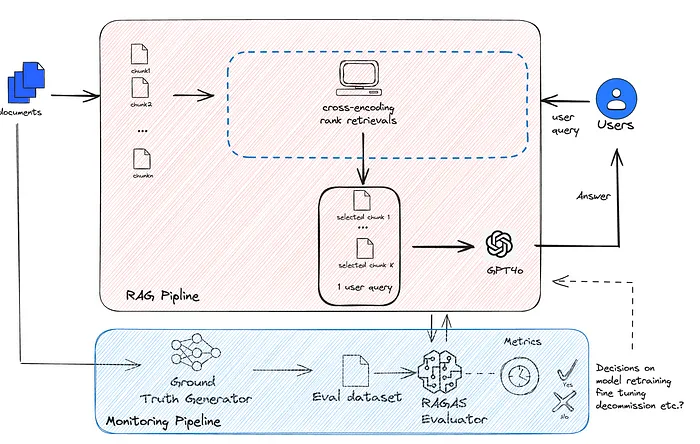
在本文中,我们利用 RAGAS 提供的指标来比较基于 reranker 的 RAG 管道和基于嵌入的常规 RAG 管道的性能。我们当前的用例是对固定的文档正文执行 Q/A 批处理所得。但是,相同的架构也可用于文档的连续摄取,因为 Ground Truth 数据集可以自动生成,也可以通过人机协同生成。
一、对 QA 结果进行人工审核
总体上表现良好
人工审核是 RAG 评估中不可或缺的一部分。两种模型都表现出相当好的性能指标。根据评估数据表,RAG 生成的答案是合理的和可追溯的。

不同上下文的答案
一个有趣的观察是,当问题是一般性问题时,例如“投资报告中描述了哪些风险?”,基于文本块的 ground truth 答案非常具体,但是,由于文档的其他部分讨论了风险,因此 GPT-4 的答案更加全面。这些一般性问题可能会对模型性能指标产生不利影响。然而,这不是管道的性能问题,而是问题的歧义。
吸取的教训是,对于模型评估数据集的生成,最好设计问题来询问具体的事实信息。

观察到由于使用不同上下文而导致的差异。建议将问题限制在具有具体答案的事实问题上。
指标不稳定性
通过多次运行工作流,我们观察到指标略有变化,这可能是由于 GPT-4 生成的随机性和上述一般问题造成的。对于稳定的系统,变体不应更改排名。
我运行了该流程 3 次,指标各不相同,尤其是在第二次运行中,它显示 ChromaDB 中的忠实度和 ReRanker 中的答案相关性等指标存在显著变化。然而,总体排名保持不变。ChromaDB 的整体表现优于 ReRanker。
为了减轻不稳定性,我们可以使用平均 3 次运行。或者,我们可以增加评估数据集中的问题数量。

metrics in run 1 运行 1 中的指标

metrics in run 2 运行 2 中的指标

metrics in run3 Run3 中的指标
二、整体代码实现
导入相关的包
# Libraries for environment and API accessimport osfrom dotenv import load_dotenv, find_dotenvimport openaifrom openai import OpenAI
# Data handling and processing librariesimport pandas as pdfrom datasets import Dataset
# PDF processing and text manipulationfrom pypdf import PdfReaderfrom langchain.text_splitter import RecursiveCharacterTextSplitter, SentenceTransformersTokenTextSplitter
# Machine Learning and NLP librariesfrom sentence_transformers import CrossEncoderimport numpy as npfrom tqdm import tqdm
# Utilities and custom functionsfrom helper_utils import word_wrapfrom RAG_pipeline1_chromadb import chromadb_retrieval_qafrom RAG_pipeline2_crossencoder import rag, rank_doc

# Metric evaluationfrom ragas import evaluatefrom ragas.metrics import ( answer_relevancy, faithfulness, context_recall, context_precision, context_relevancy, answer_correctness, answer_similarity)
# Load environment variables_ = load_dotenv('.env')openai.api_key = os.environ['OPENAI_API_KEY']
Evaluate RAGAS
请注意,helper函数和 RAG 管道在以下代码块中使用。
from helper_utils import word_wrapfrom RAG_pipeline1_chromadb import chromadb_retrieval_qafrom RAG_pipeline2_crossencoder import rag, rank_doc加载文档
# # Load Tesla 2023 10K reportpdf_file='./data/tesla10K.pdf'通过 RAG 管道运行输入文档并将其与评估数据集相结合,从而创建 RAGAS 数据集。它基本上填满了答案列。结果表用于 RAGAS 评估。

def create_ragas_dataset(rag_pipeline, pdf_file, eval_dataset): rag_dataset = [] for row in tqdm(eval_dataset): try: # Assuming rag_pipeline is a callable function that accepts a question # it needs to point to the text/pdf to run RAG on each row of questin answer = rag_pipeline(pdf_file, row["question"]) # Update based on your actual pipeline usage
 content = "No content available" contexts = ["No detailed context available"]
 # Check the type and contents of the answer if isinstance(answer, dict): content = answer.get('result', content) # Safely get result from answer # Ensure 'context' is in answer and is a list before extracting if 'context' in answer and isinstance(answer['context'], list): contexts = [context.page_content for context in answer['context']]
 elif isinstance(answer, str): # If answer is a string, directly use it as content content = answer
 # Append the collected data to rag_dataset rag_dataset.append({ "question": row["question"], "answer": content, "contexts": [row['context']], "ground_truths": [row["ground_truth"]] }) except Exception as e: print(f"Error processing row {row}: {e}") continue # Optionally skip to next row or handle error differently
 # Convert the list of dictionaries to a DataFrame and then to an Arrow Dataset rag_df = pd.DataFrame(rag_dataset) rag_eval_dataset = Dataset.from_pandas(rag_df) return rag_eval_dataset
评估指标
def evaluate_ragas_dataset(ragas_dataset): result = evaluate( ragas_dataset, metrics=[ context_precision, faithfulness, answer_relevancy, context_recall, context_relevancy, answer_correctness, answer_similarity ], ) return result加载评估 ground truth 数据集,生成 Ground Truth 数据集需要多次扫描并生成文档。根据文档的大小,它可能既昂贵又耗时。对于这个单一文档案例,通过使用 GPT-3.5 和 GPT-4 API 生成一个全面的 ground truth 数据集大约需要 5 美元的tokens。
我们从本地驱动器加载 Ground Truth 数据集。自动生成 Ground Truth 数据集的代码可以在参考文献中找到。
eval_dataset = Dataset.from_csv("./data/groundtruth_eval_dataset.csv")评估 RAG 管道 1
ragas_dataset_pline1 = create_ragas_dataset(chromadb_retrieval_qa, pdf_file, eval_dataset )
evaluation_results_pline1 = evaluate_ragas_dataset(ragas_dataset_pline1)
最初创建了一个 ChromaDB 向量数据库,对于后续的 QA,使用 get_collection()方法来减少延迟。


评估 RAG 管道 2
由于基于 reranker 的 RAG 通过逐个扫描文本块来回答问题,回答评估数据集中的所有 10 个问题, RAG 管道使用了 10 次。为了减少延迟,我们将清理后的文本块缓存在内存中。
ragas_dataset_pline2 = create_ragas_dataset(rag, pdf_file, eval_dataset)
evaluation_results_pline2 = evaluate_ragas_dataset(ragas_dataset_pline2)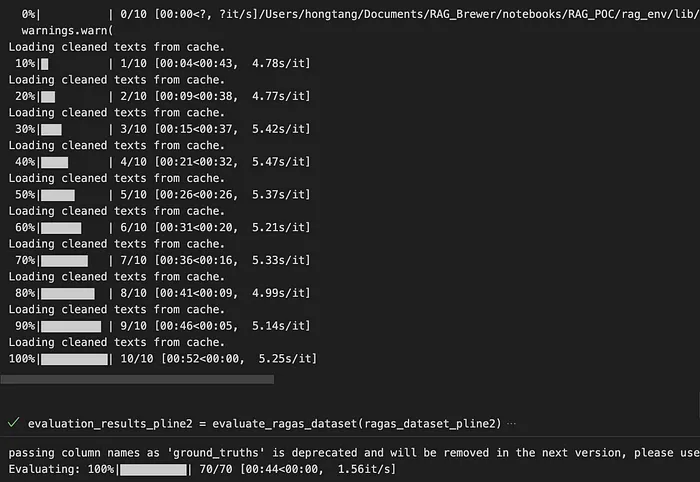
比较结果
result = pd.concat([df_pl1, df_pl2], axis=1)result.to_excel('merged.xlsx')最终结果

总之,使用模型监控管道完成了端到端 RAG 管道。通过一个案例研究,使用该管道评估和比较了两个 RAG 管道。建议生成基于事实的ground truth数据集,以避免对 RAG 管道进行不公平的评估。可以通过多次运行监控管道来平均指标,或者通过增加评估数据集的数量来缓解评估指标的不稳定性。
参考文献:
[1] https://github.com/stanghong/ragas_pipeline_eval
[2] https://medium.com/@Stan_DS/build-a-100-free-hallucination-free-secure-rag-chatbot-using-reranker-and-gpt4o-96c2eea24f95
[3] https://medium.com/@Stan_DS/efficient-rag-model-assessment-using-ragas-c9153643abb1
[4] https://medium.com/@Stan_DS/evaluate-your-rag-system-using-ndcg-4d45fac1bf0d
[5] https://medium.com/@Stan_DS/improving-rag-relevancy-and-minimizing-false-negative-using-query-augmentation-re-ranking-and-b7227068dd56
文章转自微信公众号@ArronAI