使用 IntersectionObserver API 实现图片懒加载 - Divotion
使用 IntersectionObserver API 实现图片懒加载
在API 实现图片懒加载,并探讨其优势。
浏览器原生懒加载功能
为了实现图片懒加载,传统方法通常依赖 JavaScript,通过将 data-src 转换为 src 属性来延迟加载图片。然而,现代浏览器已经提供了原生支持,只需在图片标签中添加 loading 属性即可实现懒加载。
loading 属性的选项
eager:无论图片在页面中的位置如何,都会立即加载。auto:使用浏览器的默认行为,效果等同于未设置该属性。lazy:当图片接近用户视口时,才会开始加载。
需要注意的是,使用 loading 属性时,必须为图片指定宽度和高度。如果未指定尺寸,可能会导致页面布局的抖动,特别是在图片加载时间较长的情况下。
浏览器支持情况
尽管 loading 属性提供了简单的懒加载方式,但其支持范围仍然有限。以下是当前浏览器对该属性的支持情况:
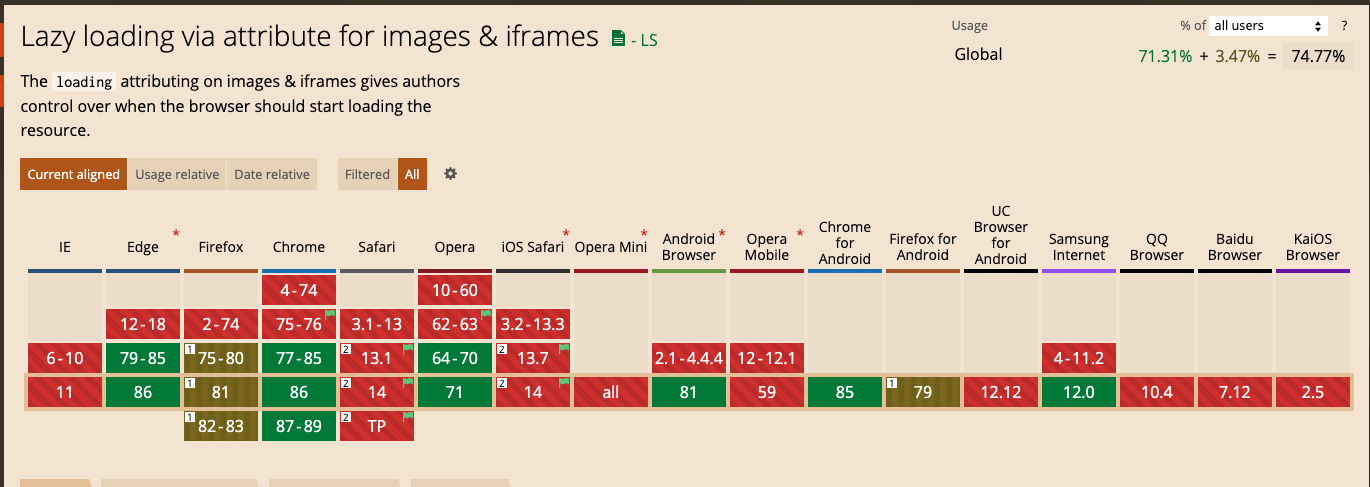
使用 IntersectionObserver API 实现懒加载
为了兼容更多的浏览器,我们可以使用 Google 推荐的 IntersectionObserver API 来实现懒加载。该 API 提供了一种异步观察目标元素与视口交叉状态变化的方法,支持范围更广,性能也更优。
IntersectionObserver 的实现原理
通过将图片的 src 属性替换为 data-src,可以防止浏览器在页面加载时立即加载图片。当图片进入视口时,使用 IntersectionObserver 将 data-src 的值赋给 src 属性,从而实现懒加载。
以下是具体的实现代码:
const images = document.querySelectorAll(".lazy-load");

const imageObserver = new IntersectionObserver((entries) => {
  entries.forEach((entry) => {
    if (entry.isIntersecting) {
      const lazyImage = entry.target;
      if (lazyImage.dataset.src) {
        lazyImage.src = lazyImage.dataset.src;
        imageObserver.unobserve(lazyImage);
      }
    }
  });
});images.forEach((image) => {
  imageObserver.observe(image);
});
在 Vue 中使用懒加载指令
在 Vue 项目中,可以通过自定义指令的方式实现懒加载。以下是一个完整的实现示例:
自定义指令代码
import { Directive } from "vue";

const LazyLoadDirective: Directive = {
  mounted(el) {
    const imageObserver = new IntersectionObserver((entries) => {
      entries.forEach((entry) => {
        if (entry.isIntersecting) {
          const lazyImage = entry.target as HTMLImageElement;
          if (lazyImage.dataset.src) {
            lazyImage.src = lazyImage.dataset.src;
            imageObserver.unobserve(el);
          }
        }
      });
    });
    imageObserver.observe(el);
  },
};export default LazyLoadDirective;
在 Vue 项目中注册指令
import { createApp } from "vue";
import App from "./App.vue";
import LazyLoadDirective from "./directives/LazyLoadDirective";

const app = createApp(App);
app.directive("lazy", LazyLoadDirective);
app.mount("#app");
在模板中使用
在 Vue 模板中,可以通过以下方式使用自定义指令:
<img data-src="image-url.jpg" alt="Lazy Loaded Image" />实现效果
通过上述代码,我们可以在 Vue 3 项目中实现图片懒加载功能。以下是一个示例,其中包含多个徽标图片,并设置了顶部填充为 50vh,以便用户滚动查看懒加载效果:

总结
图片懒加载是提升网页性能的重要手段。通过使用浏览器原生的 loading 属性,可以实现简单的懒加载功能,但其支持范围有限。而借助 IntersectionObserver API,不仅可以兼容更多浏览器,还能灵活控制懒加载的行为。在 Vue 项目中,通过自定义指令的方式,可以轻松实现图片懒加载功能,从而为用户提供更流畅的浏览体验。
原文链接: https://www.divotion.com/blog/lazy-load-images-with-the-intersection-obersver-api